![[backbone logo]](../images/logo.gif)




 
BACKBONE RADIO FEATURES
With Backbone Radio you get the full control and advanced features you need to start and operate a professional Internet radio station. Compare the feature sets of Backbone Radio Standard and Pro, and choose the product that is right for you.  Backbone Radio Pro vs. Standard
Features
Backbone Radio Standard
Backbone Radio Pro
Configuration: Studio Client and Server
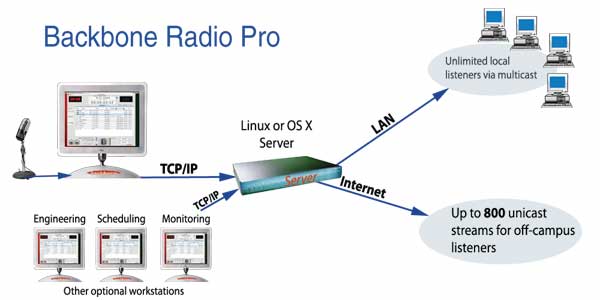 One piece, Macintosh. All control and streaming from the single Mac computer. Must remain ON while station is on the air. Two piece.
Live and automated operation
Let your station run itself from its digital clip database, according to your playlists and schedules, and go live anytime with the click of a button. All with the quality, reliability, universality, and efficiency of MPEG-4
Yes
Yes
Remote control/live from events
Cover live feeds from remote events, games, etc. Control playlists, commercials and stream live with a laptop.
No. All operation is local from the Mac computer.
Yes. Connect from anywhere via IP to server for live remotes.
Maximum audience size
Your potential listener base depends on the software limit, shown here, and your Internet connection speed. Normally Backbone Radio Pro servers will be hosted where bandwidth is plentiful, and Pro allows expansion to an unlimited audience size.
100 simultaneous listeners, limited to available bandwidth. Not expandable.
750 simultaneous listeners per server. Expandable by adding expansion servers, optional.
Automation schedules
Schedule your programs days, weeks or even months in advance. Add program playlists to your schedule, with absolute or relative times, and even plug in repeating items.
Yes. Limited functionality.
Yes. All features.
 Automatic Podcast creation Automatic Podcast creationJust click a button, and your playlist is rendered into a podcast of your program, with all the necessary XML attached, and posted to your site.
Yes
Yes
 Automatic playlist generation, using Standard Rotation. You provide the template, and Backbone Radio fills in the songs, according to the rules. Automatic playlist generation, using Standard Rotation. You provide the template, and Backbone Radio fills in the songs, according to the rules.
Yes
Yes
 Live recording to disk Live recording to diskincluding Voice Tracking. Add intros and outros, attach them to songs, and make your automated show sound live.
Yes
Yes
Yes
Yes
 Text annotation & overlays Text annotation & overlaysProvide visual information as to artist, album, year, etc., overlaid on your images, as on music videos.
Yes
Yes
 Gather demographics Gather demographicsSee real-time listener logs on your station, and use this info to get sales and simplify regulatory reporting.
Yes
Yes
|
 |
      |
|